



Table of Contents
ToggleAccounting software for growing business starts to show its limits in one specific moment: the day you open a second warehouse, a second storefront, or a second sales channel, and nobody can tell you where your inventory actually sits or what last month looked like for each location on its own.
Up to that point, most tools work fine. A single location, a handful of SKUs, and one bank feed do not ask much of any accounting platform. Add a second location, a manufacturing step, or a few thousand more line items a month, and the cracks show up fast: stock counts that do not match the books, reports that only make sense at the whole-company level, and a bookkeeper who is now closing the month by hand in a spreadsheet.
This guide walks through what accounting software for a growing business actually needs to handle once inventory and multiple locations enter the picture, how to tell your current system has hit its ceiling, and where businesses commonly go wrong when they finally make the switch. The data below comes from the U.S. Census Bureau, the Federal Reserve, FASB, and the IRS, so you can verify it independently.
Why Basic Accounting Software Runs Out of Road
Entry-level accounting software is built for a single-location service business, not a product business tracking stock across several sites. That mismatch is exactly where growing companies get stuck.

The scale of this shift is easy to underestimate. According to the U.S. Census Bureau’s Statistics of U.S. Businesses program, more than 2 million multi-unit enterprises now operate alongside over 6 million single-location establishments in the United States. Every one of those multi-location businesses crossed the same line at some point: from a system built for one place to one that has to talk to several at once.
Growth itself is the trigger. The Federal Reserve’s 2026 Report on Employer Firms, based on the 2025 Small Business Credit Survey, found that reaching customers and growing sales was the most commonly reported operational challenge among small employer firms, ahead of hiring and staff retention. Growing sales is the goal. The accounting system just has to be able to keep up with it once it happens.
Inventory adds a second layer of complexity that most basic platforms were never designed for. Stock has to be valued correctly, tracked across every location it sits in, and reconciled against what is physically on the shelf. Get any one of those three wrong, and gross margin, tax liability, and pricing all inherit the error.
What Accounting Software for a Growing Business Actually Needs to Do
The right accounting software for growing business is judged less by its price tag and more by what it can automatically handle without a human stepping in to reconcile the gap. For an inventory-heavy, multi-location operation, that comes down to a specific set of capabilities.
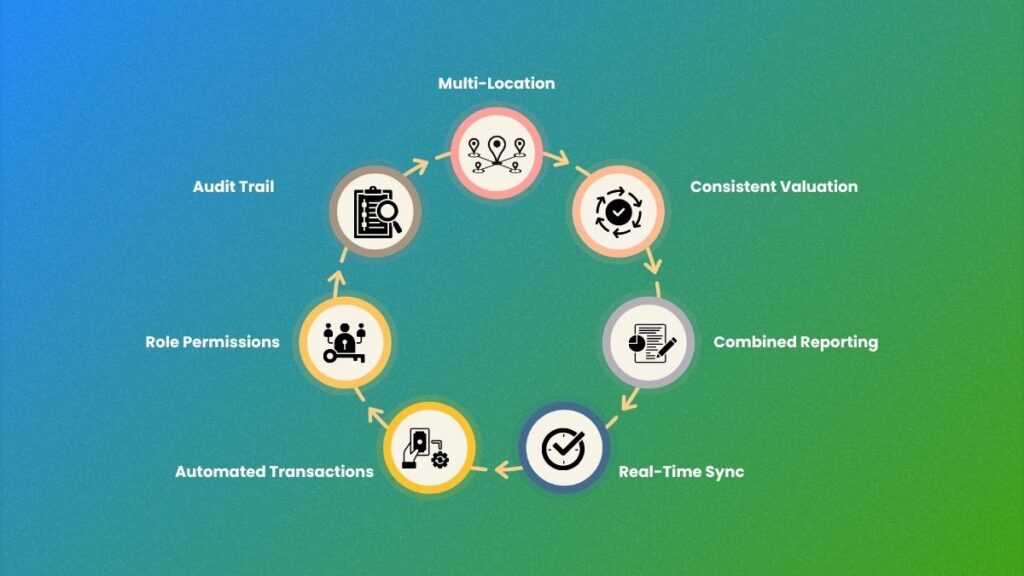
At minimum, the system needs to:
- Track inventory by location, not just in total. You need to see what is sitting in Warehouse A versus Warehouse B, not a single blended number for the whole company.
- Value inventory consistently across every site. Whichever valuation method you use, first-in-first-out (FIFO), last-in-first-out (LIFO), or weighted average, it has to apply the same way at every location.
- Produce location-level and consolidated reports on demand. Owners need both views: how each site is performing on its own, and how the business looks as a whole.
- Sync with a warehouse or inventory management system in near real time. A daily or weekly manual import is exactly the kind of gap where stock counts and accounting records start to drift apart.
- Automate bank feeds, AP, and AR across multiple entities or locations. Manually entering transactions for each location multiplies the workload every time you add a site.
- Support multiple users with location-specific permissions. A manager at one site should not need visibility into every other location’s raw financials.
- Maintain a clean audit trail as transaction volume grows. More locations mean more transactions, and a system that cannot scale its recordkeeping becomes a liability at tax time or during a bank review.
A platform that checks most of these boxes is doing its job. One that checks none of them is the reason month-end has started taking three weeks instead of one.
Getting Inventory Valuation Right as You Scale
Inventory valuation is where growing businesses most often get accounting software wrong, because the choice that worked at one location does not automatically work at five.

Cost of goods sold (COGS), the direct cost of the goods you sold in a given period, depends entirely on which valuation method you use. Per IRS Publication 538, businesses in the United States can generally choose between FIFO, LIFO, or specific identification, and each produces a different result depending on whether prices are rising or falling. FIFO tends to show a lower COGS and higher closing inventory during inflation. LIFO does the opposite. Once you adopt a method, switching to another one later requires filing Form 3115 with the IRS, so it pays to get the choice right the first time, before you are running it across multiple locations instead of one.
GAAP adds its own requirement on top of the valuation method itself. Under FASB’s ASC 330, following the simplification introduced by ASU 2015-11, inventory measured using FIFO or average cost must be reported at the lower of cost and net realizable value, meaning if your stock is worth less than it cost you (due to damage, obsolescence, or falling prices) the loss has to be recognized in the period it happens, not buried until the item eventually sells. Software that cannot apply this consistently across every location will quietly understate losses at some sites and overstate them at others.
Landed costs, freight, customs duties, insurance, and inspection fees, belong inside this same valuation, not tucked away in a general shipping expense line. Leave them out, and gross margin looks better on paper than it is in reality, a mistake that compounds fast once you are shipping into multiple warehouses with different freight lanes.
Multi-Location Reporting Without Losing the Big Picture
Multi-location reporting is the feature growing businesses discover they need only after they already lack it. By then, the owner has usually spent a full week stitching together numbers from three different spreadsheets just to answer a basic question about which site is actually profitable.

Good multi-location accounting software for growing business should let you do a few things without extra manual work:
- See profit and loss by location, not just for the company as a whole, so underperforming sites do not hide behind strong ones.
- Consolidate multiple entities or locations into one set of financial statements when the business structure calls for it.
- Track intercompany transactions if inventory or cash moves between locations, so nothing gets double-counted or missed.
- Compare location performance side by side, using the same chart of accounts, so the numbers are actually comparable.
Without this, a business with three profitable locations and one struggling one will report as “fine overall,” right up until the struggling location’s losses catch up with the rest. Our inventory and finance sync service exists specifically to close this gap, connecting inventory movement at each site directly to the accounting record instead of relying on someone reconciling it by hand.
Signs Your Current System Has Hit Its Ceiling
Most businesses do not decide to switch accounting software. They get pushed into it by a specific, recognizable set of symptoms.

Watch for these signs that your current system has outgrown its usefulness:
- Month-end close has crept from a few days to two or three weeks.
- Your bookkeeper needs a side spreadsheet to track things the software should handle natively.
- Two people can pull the “same” report and get different numbers.
- Adding a new location means manually rebuilding processes that should have been repeatable.
- Nobody trusts the inventory number on the balance sheet without double-checking it first.
Any one of these on its own is annoying. Two or three at once is usually a sign that the software, not the team, is the actual constraint. This is a recognizable pattern we walk through in more detail in our guide to hiring a bookkeeper for inventory, since the symptoms often show up as a staffing problem before anyone identifies the system underneath it.
There’s also a quieter, structural reason this keeps happening. The BLS Occupational Outlook Handbook projects employment for bookkeeping, accounting, and auditing clerks to decline 6% between 2024 and 2034, even with a median annual wage of $49,210, a trend the Bureau links to routine bookkeeping tasks increasingly being automated by software. Hiring your way out of an outgrown system gets harder every year as the underlying labor pool shrinks. Fixing the system tends to be the more durable answer.
Matching the Software to Your Stage of Growth
The right accounting software for growing business changes depending on what stage that business is actually at, and picking a size-appropriate tool matters more than picking the most feature-rich one available.

For businesses in the $5M to $20M range, a cloud accounting platform (commonly QuickBooks Online or Xero) paired with a dedicated inventory module usually covers what’s needed, provided the two systems are properly synced rather than loosely connected. For businesses moving past $20M, particularly those running multiple entities or countries, a more comprehensive ERP-style platform starts to earn its cost, since spreadsheet workarounds that were tolerable at $10M become a genuine risk at $30M.
The mistake most owners make here is assuming the software itself is the bottleneck and jumping straight to a bigger, pricier platform. Usually, the process and the reconciliation discipline around the existing system need fixing first. Our accounting system setup service is built around this exact sequence: confirm what the current setup can actually do before recommending a change, rather than assuming a bigger tool automatically solves a process problem.
Businesses operating in the UK face a parallel requirement worth flagging here. Under HMRC’s Making Tax Digital rules, every VAT-registered business, regardless of turnover, has been required to keep digital records and file VAT returns through compatible software since April 2022. Any accounting software being evaluated for UK operations needs to be on HMRC’s recognized list, not just capable in general terms.
Where Growing Businesses Trip Up During a Software Switch
A software switch fails less often because of the software itself and more because of how the switch gets handled. A handful of avoidable mistakes account for most of the pain.

- Migrating everything at once instead of location by location. A single “big bang” cutover across every site on one date multiplies the risk if anything goes wrong.
- Skipping a parallel run. Running the old and new systems side by side for one full close cycle catches mismatches before they become permanent.
- Not assigning clear ownership of the reconciliation step. Someone specific, not “finance” as a department, needs to own matching inventory records to accounting records on a fixed schedule.
- Underestimating data cleanup before migration. Bad data migrated into a better system is still bad data, just in a nicer interface.
- Choosing software based on brand recognition rather than fit. The most popular platform in your industry is not automatically the right one for your specific mix of locations and inventory complexity.
Getting these five right tends to prevent most of the problems that show up in the first few months after a switch.
Final Thoughts
Accounting software for a growing business is not really about the software. It is about whether your numbers still mean something once the business gets more complicated than a single location and a simple product line.
Get the inventory valuation method right, and gross margin stops being a guess. Get multi-location reporting right, and you can finally see which sites are actually carrying the business. Get the switch itself right, migrated carefully, reconciled deliberately, and owned by someone specific, and the whole exercise pays for itself well before the next growth milestone.
Outgrowing a system built for a business half your current size is not a failure on your part. It simply means that the system has done its job and needs to hand off to something built for where you are now.
Month-end stretching longer, no clean answer on which location is actually profitable, or a growing sense that you no longer trust your own numbers: you are not the only one dealing with this, and it is fixable. VNC Global specializes in helping growing, inventory-heavy businesses across multiple locations go from scattered numbers to a system they actually trust.
Visit vncglobalgroup.com and book a free 30-minute advisory session to get a clear-eyed view of what your business actually needs from its next system.
Frequently Asked Questions
There is no single best accounting software for growing business overall. The right choice depends on your revenue stage, transaction volume, and number of locations. Businesses under $20M typically do well with a cloud platform like QuickBooks Online or Xero paired with a dedicated inventory module, while businesses managing multiple entities or higher complexity often need a more comprehensive ERP-style system.
Common signs include a month-end close that has stretched from days to weeks, a bookkeeper relying on side spreadsheets to track things the software should handle, two people pulling different numbers from the same report, and a growing sense that nobody fully trusts the inventory figures on the balance sheet.
Both can handle multi-location tracking with the right add-ons and setup, but neither does it well out of the box for complex inventory operations. Most growing businesses pair one of these platforms with a dedicated inventory management system and make sure the two are properly synced, rather than relying on manual reconciliation between them.
At minimum, it should track inventory by location, produce both location-level and consolidated reports, sync with warehouse systems in near real time, automate bank feeds and AP/AR across locations, support location-specific user permissions, and maintain a clean audit trail as transaction volume increases.
GAAP does not mandate one single valuation method. It does require, under FASB’s ASC 330, that inventory measured using FIFO or average cost be reported at the lower of cost and net realizable value. Businesses using LIFO follow a related but slightly different measurement rule under the same standard.
UK businesses need accounting software that appears on HMRC’s list of MTD-recognized products. Making Tax Digital for VAT has been mandatory for all VAT-registered businesses, regardless of turnover, since April 2022, so any software being considered for UK operations needs to meet that requirement specifically.
It depends on the number of locations and the state of the existing data, but a phased migration, moving one location at a time with a parallel run before full cutover, typically takes longer upfront than a single “big bang” switch but carries far less risk of a disruptive failure.