

Table of Contents
ToggleInventory accounting software is just a glorified stockroom tracker. That is the myth. The reality is that for a product-based business above $5 million in revenue, the right software is the connective tissue between every purchase order, warehouse movement, COGS entry, and margin report you rely on to run the business. When that system cannot keep up, the first thing to break is not your operations. It is your numbers. And when you cannot trust your numbers, every pricing decision, reorder call, and cash flow projection you make is built on guesswork. This article explains exactly when basic inventory accounting software becomes the bottleneck, what the warning signs look like in practice, and which platforms are worth serious consideration when you are ready to move.
Why Basic Inventory Accounting Software Stops Working as You Grow
Companies outgrow basic accounting software when their billing complexity, reporting demands, and multi-entity structure exceed what entry-level software was built to handle.

For product businesses specifically, the inventory dimension makes this happen faster. A wholesaler running three warehouses across two states, or a manufacturer tracking BOMs across five product lines, is simply asking more of their software than it was designed to give.
The broader market reflects this pressure.
The global inventory management software market was valued at $4,082.8 million in 2025 and is expected to reach $4,487.9 million in 2026. That growth is not driven by startups buying their first tool. It is driven by growing businesses realising their current tool no longer fits.
For many businesses, the conversation about outgrowing their current system starts somewhere between $5 million and $20 million in annual revenue. That is not a hard rule, but it is a reliable pattern. Complexity, not revenue, is the real trigger.
The 7 Warning Signs You Have Outgrown Your Current System
These seven signs show up in almost every growing distributor or manufacturer before the switch conversation starts. If two or more sound familiar, it’s worth taking seriously.

This is the clearest sign. Basic systems like QuickBooks can be inefficient for large SKU counts, and their inability to offer real-time stock visibility across all locations can lead to stockouts or excess inventory. When your warehouse count and your accounting ledger tell different stories, you stop trusting either one.
Growing businesses need real-time inventory tracking, multi-entity management, and automated financial controls that basic systems lack, and those limitations lead to excessive reliance on spreadsheets, weak audit trails, and lengthy month-end closes. If your finance team spends more time building reports than reading them, the system is the problem.
It is time to leave basic software when your team is working more in spreadsheets than in the software itself. Spreadsheets are a symptom, not a solution. Every manual export is a reconciliation risk and a time sink.
Basic systems typically do not calculate landed costs automatically. Freight, duties, and import fees sit outside the inventory record, which means your COGS is understated and your margins look better than they actually are.
Purpose-built inventory accounting platforms are designed specifically to track up-to-the-minute costs on each item, taking freight rates, duties, and landed costs into account, and will even automatically update COGS when landed costs change, even if the goods have already shipped.
Your sales team might close a deal, but that information does not automatically reflect in your accounting system. Someone has to manually enter it. Similarly, inventory updates might not sync in real time, leading to inaccurate stock levels. Manual data bridges between systems create errors at every handover point.
Small and mid-sized businesses now hold 38% excess inventory above requirements, up significantly from prior years. Much of that excess is the result of reordering by feel rather than data. A system that cannot surface demand patterns forces you into either overstock or stockout, both of which cost real money.
Businesses with complex inventory needs, such as manufacturing, assembly, or robust tracking requirements, often find that basic accounting software inventory features are limited. An unmaintained BOM does not just create inaccurate cost of goods. It makes every pricing and procurement decision downstream unreliable.
A Closer Look at the Software Landscape: Which Platform Fits Where
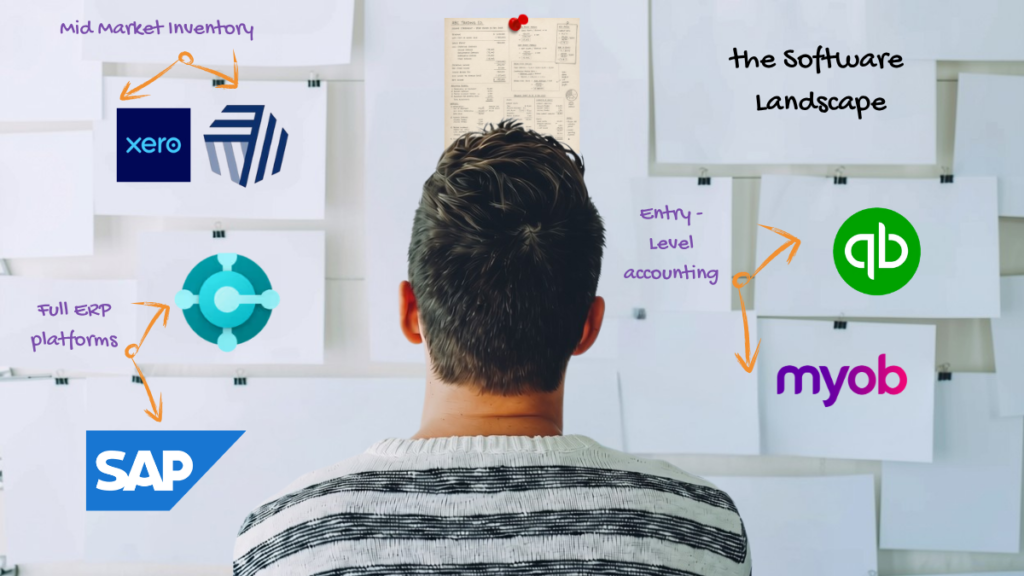
When evaluating the best inventory accounting software for a growing US product business, it helps to group platforms by what they’re actually built to do rather than by price or brand recognition. Some tools are built purely for bookkeeping, others add inventory depth on top, and a few unify the entire business under one system.
When evaluating the best inventory accounting software for a growing US product business, it helps to group platforms by what they’re actually built to do rather than by price or brand recognition. Some tools are built purely for bookkeeping, others add inventory depth on top, and a few unify the entire business under one system.
Entry-Level Accounting With Basic Inventory Tracking
QuickBooks Online: The starting point for most US small businesses. Strong general ledger and accounts payable/receivable features, but limited when SKU counts grow, or multi-location tracking becomes necessary.
Businesses that find themselves reliant on spreadsheets to conduct core accounting, have reached over 500 SKUs in inventory, or are hoping to add new channels, geographies, or products typically find they need a more comprehensive system.
MYOB: Widely used for small business accounting. Similar ceiling to QuickBooks Online for inventory-heavy businesses, suitable for straightforward operations with limited warehouse complexity.
Full ERP platforms
Microsoft Business Central: The full ERP option for businesses that have outgrown inventory-specific tools and need finance, operations, manufacturing, and reporting unified in one platform. It brings sales, purchasing, inventory, warehousing, and (on the Premium tier) manufacturing and service management into a single system, with native Power BI reporting built in.
It’s the natural next step once a business outgrows Cin7’s order caps or needs deeper multi-entity accounting than Xero or QuickBooks can provide.
SAP: Enterprise-grade ERP suited to larger, more complex businesses, typically above the $30 million revenue range for standard implementations.
Inventory Accounting Software and Microsoft Business Central: The Mid-Market Case
Microsoft Dynamics 365 Business Central eliminates the integration problem by bringing all business functions, including finance, sales, inventory, and operations, into one unified platform.
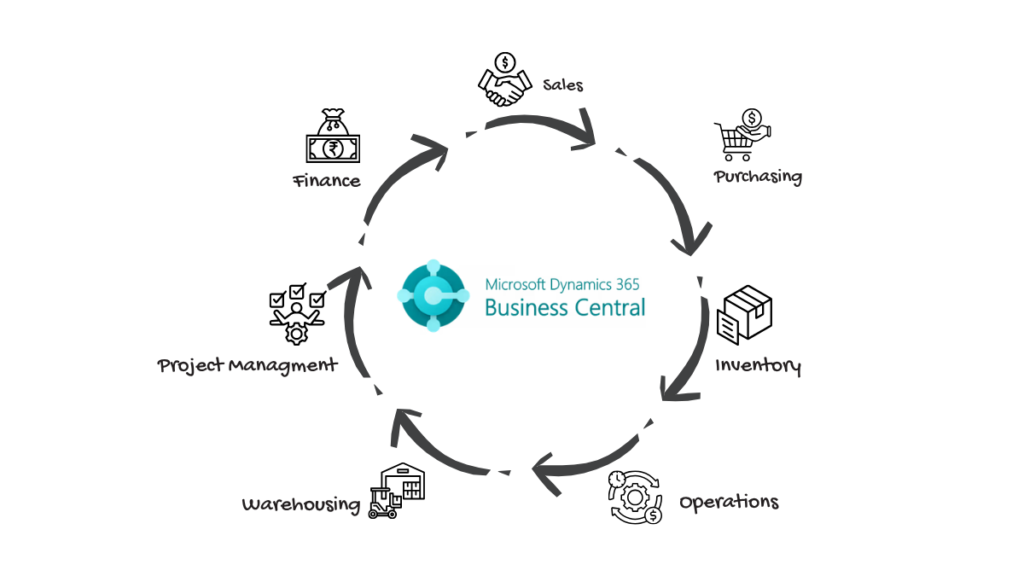
For a manufacturer or distributor that has already patched together three separate systems and is still reconciling manually, that unification is the core value proposition.
Business Central cloud licences start at $80 per user per month for Essentials and $110 per user per month for Premium, billed annually, based on Microsoft’s US list price as of November 2025. The Essentials tier covers finance, sales, purchasing, inventory, warehousing, and project management, while Premium adds manufacturing and service order management on top.
On the implementation side, budgets vary significantly by scope.
Business Central also integrates with Xero and MYOB where businesses maintain those as their primary accounting layers in a hybrid configuration, though for most mid-market US businesses moving from basic tools, Business Central replaces those systems entirely rather than sitting alongside them.
A closer look at multi-state inventory accounting considerations is worth doing before committing to a Business Central scope.
Cin7 as Inventory Accounting Software: What It Handles and Where It Ends
Cin7 integrates directly with QuickBooks and Xero, so data flows in real time, giving you accurate profit and loss without delays. That direct accounting sync is what makes Cin7 genuinely useful as an inventory accounting software layer: you keep the accounting tool your team already knows and add real-time inventory intelligence on top of it.
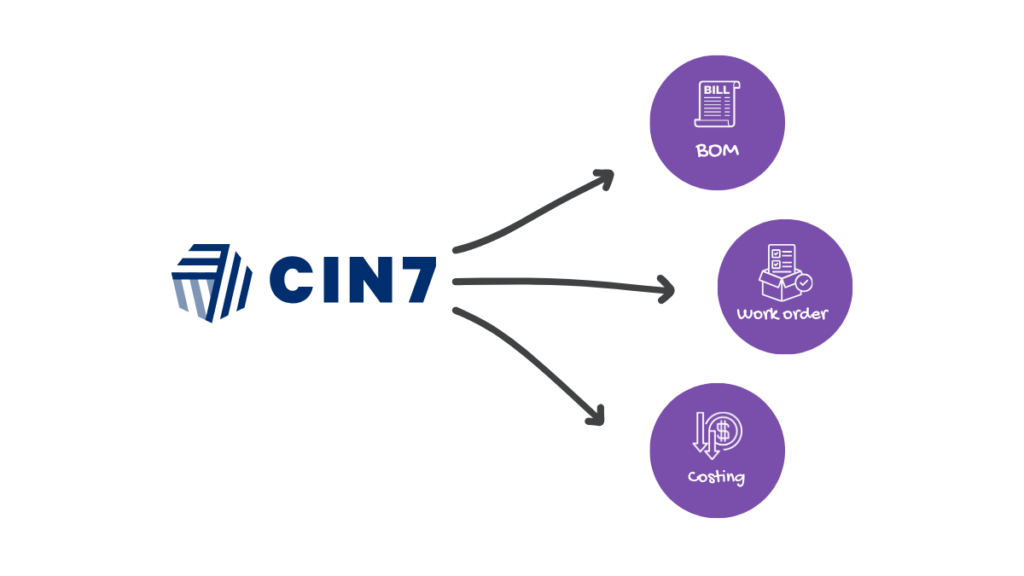
Most SMB inventory tools cannot handle light manufacturing, forcing upgrades to expensive ERPs. Cin7 includes built-in production features so you can manage BOMs, work orders, and costs within the same system.
For a manufacturer in the $5 million to $15 million range that is not yet ready for a full ERP, that BOM and production capability is a meaningful upgrade over basic software. Cin7 Omni starts at $349 per month for the Standard plan with up to 5 users, $599 for the Pro plan with 10 users, and $999 for the Advanced plan with 15 users.
That pricing is a reasonable entry point for a business that has outgrown basic software but is not yet at the complexity level that demands full ERP.
The Limitation Worth Understanding: Cin7 is an inventory and order management platform. It does not replace your accounting software. It feeds it. If your accounting needs have also become complex, meaning multi-entity consolidation, dimensional reporting, or manufacturing job costing at scale, you may find you need both Cin7 and a more capable accounting layer, or a pivot directly to Business Central. The production accounting questions that decide which path fits, including BOM depth, scrap tracking, and work order costing, are covered in more detail under what a manufacturing accountant checks each month.
What Experienced Finance Operators Prioritise When Evaluating a Replacement
When evaluating a replacement, experienced finance operators tend to check the same handful of things first, regardless of which platform they land on.
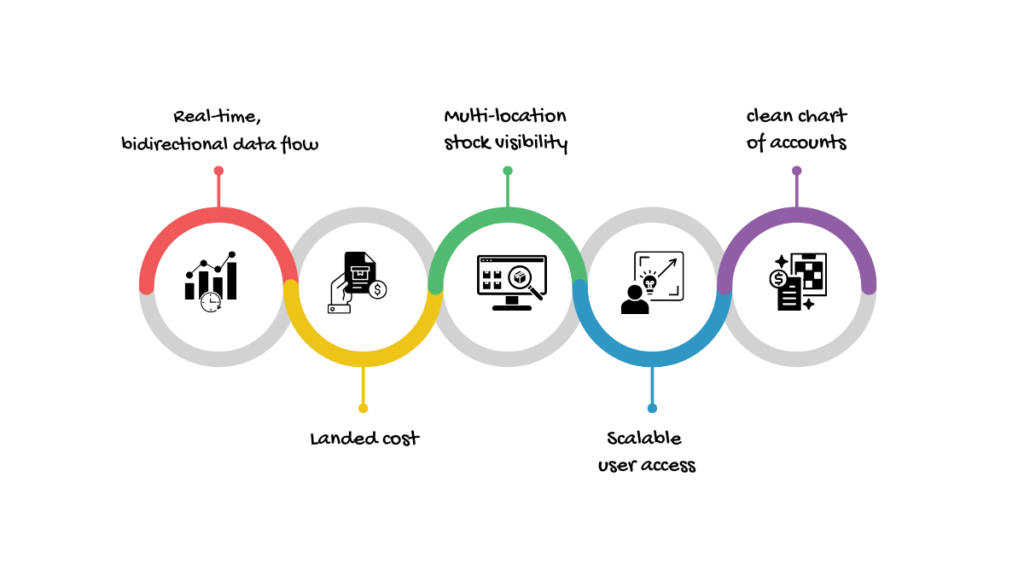
- Real-Time, Bidirectional Data Flow: The accounting record and the inventory record must update each other automatically. Any manual step between the two is a future reconciliation problem. Automated data flow from sales, inventory, and operations into accounting systems enables faster month-end close cycles, improved cash flow management, and enhanced regulatory compliance.
- Landed Cost Capture at the Purchase Order Level: If the system cannot attach freight, duties, and handling to individual SKUs at the point of purchase, your COGS figures will never be accurate. This is not a nice-to-have for a US importer. It is foundational. GAAP requires inventory to be stated at cost, and landed cost is part of that cost under US GAAP.
- Multi-Location Stock Visibility: A single inventory ledger across all warehouse locations, updated in real time, is the baseline for any business operating more than one stocking location. If you are manually consolidating location reports in a spreadsheet, you are already at risk.
- Scalable User Access Without Data Degradation: High implementation costs and integration challenges with legacy systems hinder adoption among some small enterprises, but over 70% of businesses are now adopting cloud-based inventory management solutions specifically to achieve scalability and reduce operational costs. The platform you choose now should not require a replacement within three years.
- A Clean Chart of Accounts Designed for Inventory Businesses: The technical setup of the platform matters less than how well the chart of accounts maps to your actual cost structure. COGS, inventory valuation, variance accounts, and landed cost accruals must be set up correctly from day one, or every report the system produces will mislead rather than inform. Getting this configuration right is usually part of a broader bookkeeping engagement, not a standalone fix.
Common Mistakes Businesses Make When Switching Systems
Most failed transitions don’t fail because of the software. They fail because of how the switch was handled, from the data that gets migrated to who ends up owning the project internally. The five mistakes below are the ones that come up most often, and every one of them is avoidable with the right sequencing.

- Migrating Bad Data Into the New Platform: A new system does not fix corrupted historical data. If your current inventory records are inaccurate, you need to reconcile and clean the data before migration, not after. Importing incorrect opening balances creates months of confusion that immediately undermines confidence in the new system.
- Underestimating Implementation Time: In a CFO survey, 88% of CFOs underestimated how long it takes to move financial processes to an enterprise-grade system. For a $10 million distributor, a realistic Business Central implementation runs 3 to 5 months. A Cin7 implementation for a similar business is typically 4 to 8 weeks, though chart-of-accounts setup and integration testing add time that vendors often do not quote upfront.
- Choosing the Platform Before Defining the Process: Software should map to how the business actually works, not force the business to work around the software. Defining your purchase-to-pay and order-to-cash workflows before you evaluate platforms will filter out tools that cannot accommodate your operational reality.
- Treating It as an IT Project Instead of a Finance Project: The biggest difference a new system delivers is usually not more software. It is fewer workarounds. Finance gets to spend less time maintaining reports and more time helping guide the business forward.
- That Outcome Only Happens if Finance Leads the Implementation, Not IT: Going live without testing inventory valuation. Before switching over, run parallel COGS and margin reports from both the old and new systems for at least one full month. If the numbers diverge and you cannot explain why, the configuration is wrong. Fixing valuation logic after go-live is significantly harder than fixing it before.
Practical Checklist: Are You Ready to Upgrade Your Inventory Accounting Software?
Before committing to a new platform, it helps to pressure-test how ready the business actually is, not just how capable the software is. Use the checklist below before you begin any platform evaluation. Each item reflects a step that, if skipped, tends to surface as a costly problem after go-live rather than before it.

- Document every location where inventory data currently lives (warehouse system, spreadsheets, accounting software, sales platform) and confirm which one is your system of record.
- List every integration your new platform must support: accounting tool, sales channels, 3PL, EDI, payroll. Any gap here is a post-go-live problem.
- Decide whether you are replacing your accounting software or adding an inventory layer on top of it. This choice determines your shortlist immediately.
- Confirm your landed cost requirements: currencies, freight terms, duty structures. Platforms handle landed cost capture very differently.
- Clean your current inventory data before evaluation. Request a stock count reconciliation and resolve discrepancies now, not after migration.
- Identify your internal project owner. A finance manager or operations manager who has decision-making authority over both systems must own this project, not a general IT contact.
- Set a realistic go-live window that avoids peak trading periods. Launching a new system in November or December for a seasonal business is a high-risk decision.
- Budget separately for implementation, data migration, and training. These three line items are often quoted together, but each carries its own timeline risk.
Final Thoughts
Inventory accounting software isn’t a once-and-done decision. It needs revisiting as the business grows, because the system that handled things at $3 million in revenue is rarely the right one at $15 million.
The warning signs are usually there well before the crisis: manual reconciliations that take days, margins you can’t fully explain, and inventory numbers that don’t match the books. The real question is whether you act on those signals early or wait until a month-end blowout forces the conversation.
Cin7 and Microsoft Business Central solve genuinely different problems at genuinely different price points. The right choice depends on where your business actually is, not where it will be in five years. Getting the foundation right, including the chart of accounts, the cost methodology, and the integration map, matters more than the brand name on the software.
If your inventory and accounting numbers aren’t telling the same story, it’s worth talking to a specialist before you commit to a platform.
Visit vncglobalgroup.com and book a free 30-minute advisory session to get a clear-eyed view of what your business actually needs from its next system.
Frequently Asked Questions
Inventory management software tracks physical stock movements: quantities, locations, and orders. Inventory accounting software connects those movements to financial records, including COGS, inventory valuation, and margin reporting. The best platforms for growing businesses do both, or integrate tightly with each other so neither operates in isolation.
There is no fixed revenue threshold, but the pattern is consistent. For many businesses, the conversation about outgrowing basic software starts somewhere between $5 million and $20 million in annual revenue. The real trigger is operational complexity: multiple locations, growing SKU counts, or production and BOM requirements that basic tools cannot handle accurately.
Business Central cloud licenses start at $80 per user per month for Essentials and $110 per user per month for Premium, based on Microsoft’s US list price as of November 2025. On top of licenses, businesses should budget for a one-time implementation cost typically ranging from $25,000 to $150,000 or more depending on company size. For a mid-market distributor with 10 to 25 users, total first-year cost including implementation typically falls in the $60,000 to $120,000 range.
Cin7 is an inventory and order management platform, not a full accounting replacement.
Cin7 integrates directly with QuickBooks Online and Xero, offering seamless accounting integration so inventory and financial data flow between the two systems automatically. Most growing businesses use Cin7 for inventory control and retain QuickBooks Online or Xero as the accounting layer.
Reconcile your inventory records completely before migrating anything. Confirm that your current stock count matches what the accounting software shows as the inventory asset balance. Identify and resolve every discrepancy, because importing inaccurate opening balances into a new platform means your COGS and margin reports will be wrong from day one, regardless of how well the new system is configured.