



Table of Contents
ToggleEvery year around this time, business owners start looking for inventory management tips to help them through the holiday rush. When they talk it through with an adviser, the conversation usually begins with stock levels and buying plans. Before long, though, many of them admit something more basic. They aren’t completely sure their numbers are right.
That’s a hard place to start peak season from. Owners are about to place some of the biggest orders of the year, decide which products to discount and ship more than they do in most months. If the stock count is slightly off or costs haven’t been updated since spring, those small gaps grow with every order.
The good news is that most of this can be fixed in a few weeks. The ten steps below cover what product businesses can do before Black Friday. They start with the numbers and then move on to stock, margins, systems and the people who manage them.
Why the Holidays Expose the Gaps Owners Already Worry About
Holiday inventory management puts more weight on every number in your business at the moment you have the least time to check them. Problems that were manageable in September grow with every extra order.

The volume is significant. The National Retail Federation forecasts that US retail sales in November and December will grow 4.2% to $1.013 trillion. Much of that demand lands in a very short window. Adobe’s 2026 US holiday forecast expects Cyber Week, the five days from Thanksgiving to Cyber Monday, to bring in $47.5 billion of US online sales. That is about 17.3% of the whole season.
When volume rises that fast, small problems grow with it. A stock figure that is slightly off becomes an oversold order. A cost price set months ago becomes a promotion that loses money. A reconciliation two weeks behind in November can be two months behind by January.
That is why the most useful inventory management tips and tricks for peak season focus on fixing these gaps now, while order volumes are still normal.
Inventory Management Tips to Know Your Numbers Are Reliable
Are you confident your business numbers are correct? Many owners answer “mostly,” and that word carries a lot of risk into peak season. Your financial reports say one thing, your inventory system says another, and it is hard to know which to trust. These first two inventory management tips deal with that directly.

1. Make Your Inventory System and Your Ledger Agree Before Peak
“I don’t know if my numbers are right.”
Of all the inventory management tips in this guide, this one comes first because every other decision depends on it. Run the inventory valuation report from your inventory system and compare its total with the inventory balance on your balance sheet. If the two figures differ, find out why before November gets busy.
The causes are usually familiar ones. Supplier bills get posted without the matching stock receipt, landed costs go straight to expenses, manual journals get made and forgotten, and syncs between systems fail. Fix the causes as well as the balance, then repeat the comparison every week until the end of January.
2. Bring Your Accounting Up to Date Before November Closes
“My accounting is always behind.”
Peak season adds a large number of transactions to whatever backlog already exists. Catch up on bank reconciliations, supplier bills and marketplace payouts now, so the holiday period starts from a clean position.
Plan for returns as part of this work. In the NRF and Happy Returns 2025 Retail Returns Landscape report, retailers expected 17% of 2025 holiday sales to be returned. The same report found that 9% of all returns are fraudulent.
Decide now how returned stock will be inspected, restocked or written off. Make sure refunds and credits land in the same period as the stock movement.
Holiday Inventory Management Tips to Take Control of Your Cash
Do you know exactly what’s happening with your inventory? Too much stock ties up cash you may need in January. Too little costs you sales in the busiest weeks of the year. Both problems usually trace back to uncertainty about what you hold and what you need, which is where these holiday inventory management tips start.

3. Count the Products That Will Carry Your Season
“I don’t know exactly what stock I have.”
A full stocktake in November is rarely practical, so count the products that matter most. List the SKUs (stock keeping units) expected to bring in most of your holiday revenue, often the top 20% or so, and cycle count them over the next two weeks. A cycle count is a scheduled count of a small group of items, done in batches so the rest of the warehouse keeps running.
Count by bin or location as well as by total. Clear negative stock before you begin, because Cin7 Core’s stocktake guidance notes that negative stock levels can cause errors during a stocktake. The same guide explains that a location is locked while a stocktake is in progress. Keep each count small and finish it outside your busiest hours.
There is a compliance reason to keep counting, too. US Treasury regulations state that book inventory balances should be verified by physical counts at reasonable intervals and adjusted to match. If your year ends on 31 December, plan that count now.
4. Buy Week by Week and Clear What Isn’t Moving
“I don’t know what to order, when to order or how much.”
Monthly totals hide the shape of holiday demand. A product that sells 1,200 units in December may sell half of them in a single week, so buying plans built on monthly figures often land too late.
Pull last year’s fourth-quarter sales by week for each important SKU. Mark the weeks when it was out of stock or heavily promoted, because both distort the history.
A simple version of the calculation looks like this.
Units to order = forecast sales until the next delivery + safety stock − stock on hand − stock already on order
Our free SKU planning tool works this out for you, with units to buy and an order-by date for each product. Then ask every supplier with an open purchase order for a confirmed ship date.
Before buying more, free up cash from stock that is sitting still. Run an aged inventory report and choose an exit for anything unsold in the last 90 to 180 days. Bundling, clearance pricing, supplier returns and write-downs are the usual options.
Some of that stock may be damaged, out of style or in broken lots, and may no longer sell at normal prices. For US tax purposes, Treasury Regulation §1.471-2(c) says those goods should be valued at a bona fide selling price less the direct cost of disposal. That price must come from an actual offer of the goods within 30 days after the inventory date, and records must support it. Check the details with your tax adviser.
Know Which Products Make You Money This Holiday Season
You’re making sales, but are you making enough profit? Holiday revenue can look excellent while the margin on individual products shrinks under discounts, freight, channel fees and returns. These two tips make profit visible product by product.
5. Update Landed Costs Before You Set Holiday Prices
“I’m not sure which products are actually making money.”
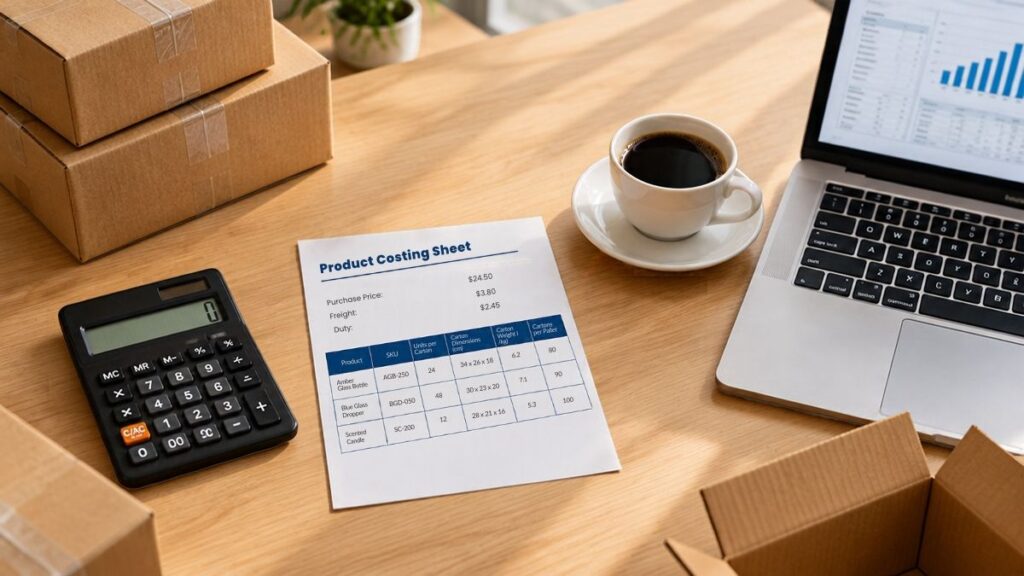
Landed cost is the full cost of getting a product into your warehouse, including purchase price, freight, duty, insurance and handling. If the cost in your system was set months ago, your holiday margins may look healthier than they are.
Before promotional prices are fixed, check that recent freight and duty charges have reached the product cost of your main holiday lines. Our guide to landed cost for importers explains how to capture each cost so it flows properly into cost of goods sold (COGS).
6. Check Margin After Discounts, Fees and Fulfilment for Each Channel
One of the most revealing inventory management tips is to calculate profit per product per channel, using the real costs of each sale. The highest price does not always produce the highest profit.
Here is a simple illustration using made-up figures. A product with an $18 landed cost sells to a wholesale customer for $30. After $1.50 of freight, that leaves $10.50.
The same product lists online at $44. After a 20% holiday discount, a 15% marketplace fee on the discounted price and $4 of fulfilment, it leaves $7.92. That gap matters when you decide where scarce stock goes and which products to promote.
Inventory Management Tips to Run Smarter and Stay Compliant
Are your business systems creating more work instead of less? Many owners have invested in good software and still have a team copying information between screens and checking whether everything matches. These three inventory management tips focus on getting the systems to carry the load before volume arrives.
7. Test Every Integration Before the Rush
“My systems don’t talk to each other.”
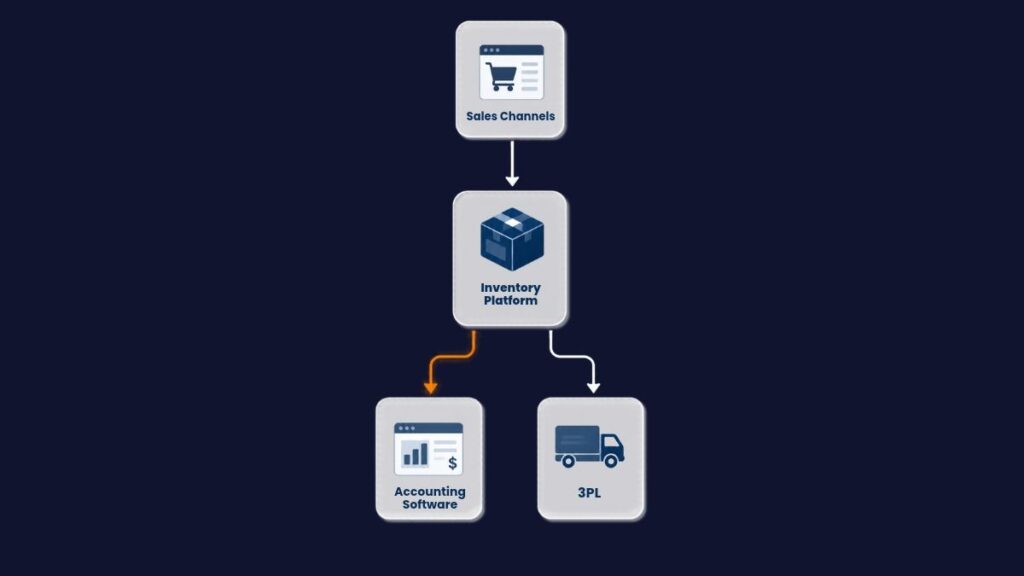
Map how an order moves through your business. It goes from the sales channel to the inventory system, then to the warehouse or 3PL (third-party logistics provider), and finally to the accounting software.
Place a test order on each channel and follow it all the way through. Check the stock movement, the invoice, the payout and the cost of goods sold entry.
Fix SKU mapping errors and failed syncs now, and aim for one available stock figure feeding every channel. If you run Cin7 Core, review your channel and accounting connections and clear any outstanding sync errors before mid-November.
8. Remove the Manual Workarounds You Can’t Afford in December
“We’re doing too much work manually.”
Ask your team to list every task they repeat by hand each week. Common examples are re-keying orders, building landed costs in spreadsheets and matching marketplace payouts line by line. Estimate how much each task will grow with holiday volume, then automate or simplify the two biggest before peak.
Tidy the product file at the same time. Merge duplicate SKUs, check every bundle’s components and confirm units of measure. Then set a mid-November cut-off after which nobody creates or edits products without sign-off.
9. Get More From the Software You Already Pay For
“We have software, but we’re not getting the results we expected.”
In our experience, disappointing results often come from how a system was set up. Reorder points that were never configured, costing settings that don’t match how the business buys, and reports nobody uses are common examples. Start with the settings that affect holiday decisions, such as reorder points, user permissions and the reports your team checks daily.
Peak season adds new users too. The NRF expects US retailers to hire between 325,000 and 375,000 seasonal workers this year. Give temporary staff their own logins with limited permissions, and have one experienced person review stock adjustments every day.
Keep compliance in mind as you make changes. The same Treasury regulation expects inventory practice to stay consistent from year to year. Changing the basis used to value inventory for tax purposes requires IRS permission, so speak with your adviser before changing a costing method. If your setup needs deeper repair, our rescue and clean-up services can help.
Grow With Confidence by Giving Every Holiday Task an Owner
Are you running your business, or is your business running you? In the weeks before peak, many owners end up chasing suppliers, checking stock and fixing errors themselves, because nobody else clearly owns those jobs. The last tip addresses that.

10. Hand Each Task to Someone Who Will Own It
“I’m spending too much time managing day-to-day problems.”
“I need someone reliable who can take ownership and get things done.”
Inventory management tips only work when each task has a named owner and a date. The table below is a practical starting point for a mid-market team, and it doubles as a checklist of tips for preparing inventory for the holiday season.
| Task | Owner | When |
|---|---|---|
| Inventory system to ledger comparison | Finance | Now, then weekly to January |
| Catch up reconciliations and payouts | Finance | Before mid-November |
| Cycle count top holiday SKUs | Warehouse lead | First half of November |
| Weekly buying plan and supplier confirmations | Purchasing | Every week from now |
| Update landed costs and channel margins | Finance | Before promotional prices are set |
| Test integrations and fix sync errors | Operations or system admin | Before mid-November |
| Product file clean-up and cut-off | Operations or ecommerce manager | By mid-November |
| Seasonal staff access and adjustment review | Warehouse lead | Before peak volume starts |
| Returns process | Customer service and warehouse | Before December |
| Year-end stock count plan | Finance and warehouse | Agreed by early December |
If you only have time for a few of these, start with the ledger comparison, the cycle counts and the integration tests. Where your team doesn’t have the capacity to own a task, bring in people who can. An unowned reconciliation in November becomes a much bigger job in January.
Final Thoughts
The problems in this guide are ones owners describe to us all year. They include numbers they can’t fully trust, systems that don’t connect, stock they can’t see clearly, unclear product profits and too many hours spent fixing things by hand. The holiday season raises the cost of each one, because every one of them grows with order volume.
The ten tips above follow the outcomes that matter most.
- Reconciling early and catching up on the books gives you numbers you can rely on.
- Counting the right products and buying week by week puts you back in control of cash.
- Updating landed costs and checking channel margins shows which products really make money.
- Testing integrations, removing manual work and fixing software settings let your systems carry the load.
- Clear ownership gives you room to grow with confidence.
This is the work we do every day with manufacturers, wholesalers, distributors and retailers. Our aim is to be the most trusted partner in accounting, inventory, analysis, automation, advisory and AI for product businesses with $5 million to $100 million in revenue, across the US, the UK, Australia, New Zealand and Switzerland. In practice, that means connecting finance, inventory, operations and reporting so that holiday decisions rest on numbers you trust.
If you want a quick read on where your business stands before peak, take our free Holiday Readiness Scorecard. It is a short self-assessment for product businesses, built with tips from the Best Cin7 Core Experts. It gives you a readiness score, a breakdown by area and your top priorities to fix first. If you’d prefer to talk it through, book a free 30-minute call and we can look at your stock, systems and margins together.
Frequently Asked Questions
Start by reconciling your inventory system with your ledger, cycle counting your top-selling products, buying week by week and updating landed costs before you set promotional prices. After that, the most important inventory management tips are to test every integration, reduce manual work and give each holiday task a clear owner.
The most common causes are supplier bills posted without matching stock receipts, landed costs booked as expenses, manual journals and sync errors between systems. Compare your inventory valuation report with the inventory balance on your balance sheet and fix each cause. Then repeat the check weekly during peak.
Ideally, start eight to ten weeks before Black Friday, and earlier if you import products with long lead times. If you are reading tips for preparing inventory for the holiday season in late October, focus first on the ledger comparison, cycle counts and confirming purchase orders.
Cycle count your fastest-moving products every week or two during peak, and investigate any large difference straight away. US Treasury regulations expect book inventory to be checked against physical counts at reasonable intervals, so plan a full count around your year-end as well.
Yes. Cin7 Core holds stock across locations and channels in one system and supports stocktakes. It also connects to Xero and QuickBooks Online, using the Plus or Advanced plans for QuickBooks. As with all inventory management tips, it works best when integrations, product data and landed costs are set up correctly before peak season starts.
Reconcile inventory with the general ledger, process all outstanding returns and review slow-moving or damaged stock for write-downs. Then compare actual sales by SKU and week against your forecast, so next year’s holiday buying starts from better data.